Many U.S. importers are getting their accounts set up because CBP has opened the process for IEEPA refunds. Since these refunds are being handled electronically, importers need to complete the necessary setup before they can move forward with the claim.
If you are planning to recover duties related to IEEPA, having the CBP ACE Secure Data Portal and ACH refund details in place is an important first step. Without this setup, the refund process may not move smoothly or may get delayed.
In this blog, we will tell you the steps you need to follow to complete the setup and get ready for the refund process.
What you need before starting
Before you begin, make sure you have the basic company and importer information ready.
CBP applications typically require your company name, importer number, business structure, and contact details tied to the importer record.
You should also confirm that your email address on file is current, because CBP uses that email to send account verification instructions. If the email is outdated, account creation can stall.
Step 1: Apply for an ACE account
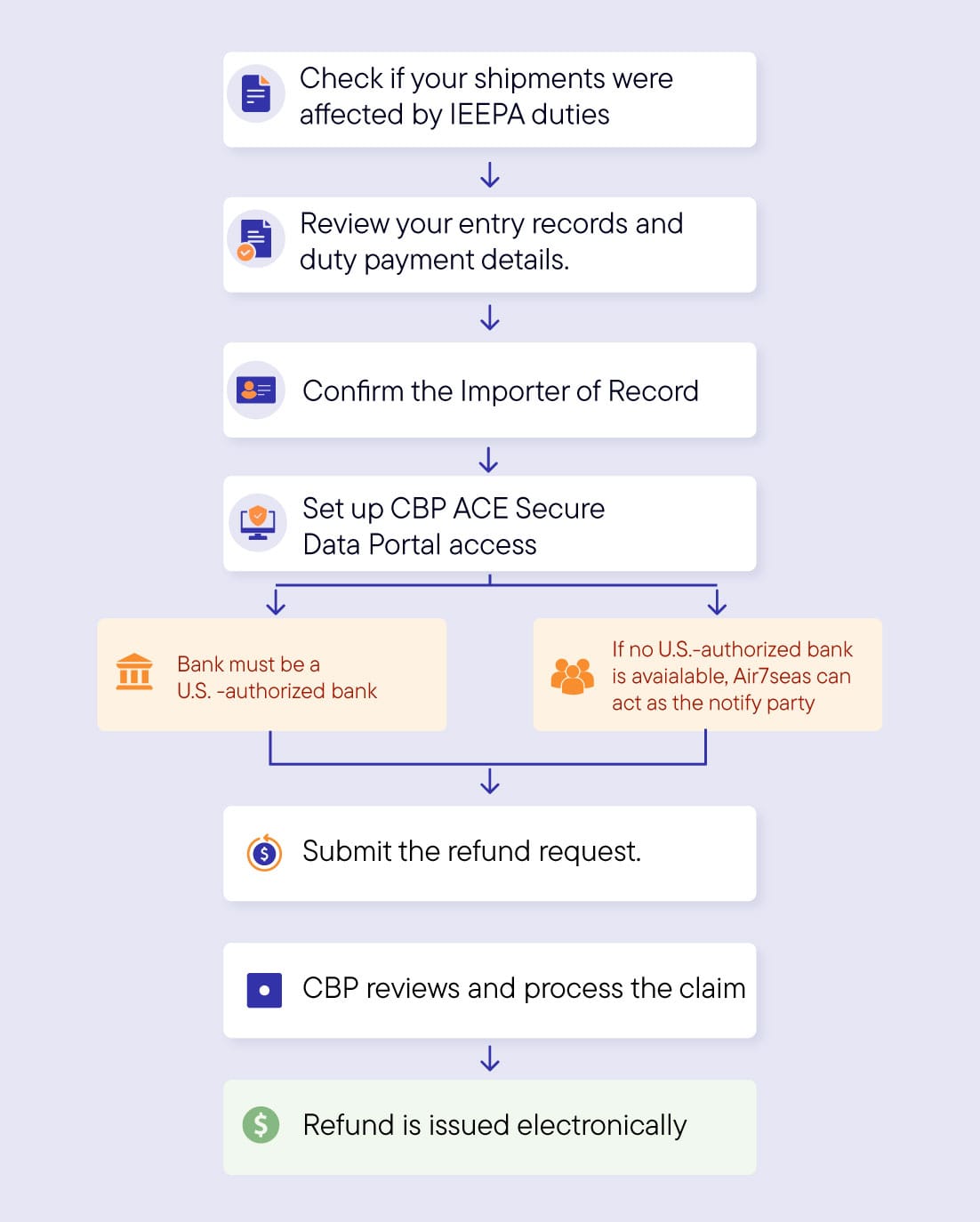
- Start by visiting the CBP ACE application page and selecting the importer option. This is where you begin the account request process and provide your company details to CBP.
- Make sure the information you enter matches your importer records. Even small mismatches can slow down approval or create login issues later.
Step 2: Verify your account
- After you submit the application, CBP sends a verification email with instructions to complete your account setup.
- You will need to open that email and follow the steps to create your password and activate your login.
- This step matters because the ACE portal cannot be used until the account is fully verified.
- If the verification email goes to the wrong inbox or an old address, the process may be delayed.
Step 3: Access the importer dashboard
- Once your login is approved, you can enter the portal and access your importer account. From there, you can manage customs-related information, track entries, and prepare for refund-related actions.
- This is the point where the ACE portal becomes a useful operational tool, not just an account setup requirement.
- It gives importers visibility into data that is often difficult to track through brokers alone.
Step 4: Set up ACH refund details
- CBP now requires refunds to be issued electronically in most cases, so ACH setup is essential. Importers should enter their banking details in the ACE portal so refunds can be deposited directly into the correct account.
- One important point to note is that the bank must be a U.S.-authorized bank for the refund to be processed smoothly. If the importer does not have a U.S.-authorized bank account, Air7Seas can act as the notify party and help get the refund processed.
- This is one of the most important steps in the process because incomplete or incorrect bank information can delay refund payments. If another party is designated to receive refunds, that arrangement must also be set up properly.
Step 5: Update your information when needed
- Once the account is live, keep it updated. If your business contact, email, banking details, or refund recipient changes, the ACE portal should be reviewed so future refunds are not interrupted.
- This is especially useful for importers who expect multiple refunds over time. A current account helps avoid avoidable processing issues later.
Why importers should act now
CBP’s electronic refund process is now the standard, and importers who are not set up properly may face delays in receiving money they are owed. Setting up ACE and ACH early helps create a smoother refund experience.
It also gives importers better control over customs data and refund tracking. That makes this setup an important part of both compliance and cash flow management.
Conclusion
The CBP ACE Secure Data Portal and ACH refund setup is a practical step every importer should complete.
Once the account is active, importers are better positioned to manage customs data, receive refunds electronically, and stay ready for future CBP updates.